How to run the backlight bleed test
- Make the room dark. Lights off, curtains closed. Bleed that is invisible in daylight can be obvious at night, and night is when you watch dark films.
- Start at your usual brightness. Judge the monitor at the setting you actually use. Then turn brightness to maximum to see the worst case — bleed scales with backlight brightness.
- Go fullscreen. Click the black area or press F. The controls and cursor fade out after two seconds so nothing else lights the screen. Wait a few seconds for your eyes to adjust.
- Look from your normal seat. Sit where you usually sit with your eyes level with the center of the screen. Close up and off-center, every IPS panel looks bad.
- Run the glow check. Press G (or tap Glow check), keep your eyes on the dot and move your head slowly left, right, up and down. Note which bright areas move and which stay put.
- Step through the dark grays. Press Space to go through 1%, 3%, 5% and 10% gray. Blotchy, cloud-like patches across the screen are clouding; the gray uniformity test covers brighter shades.
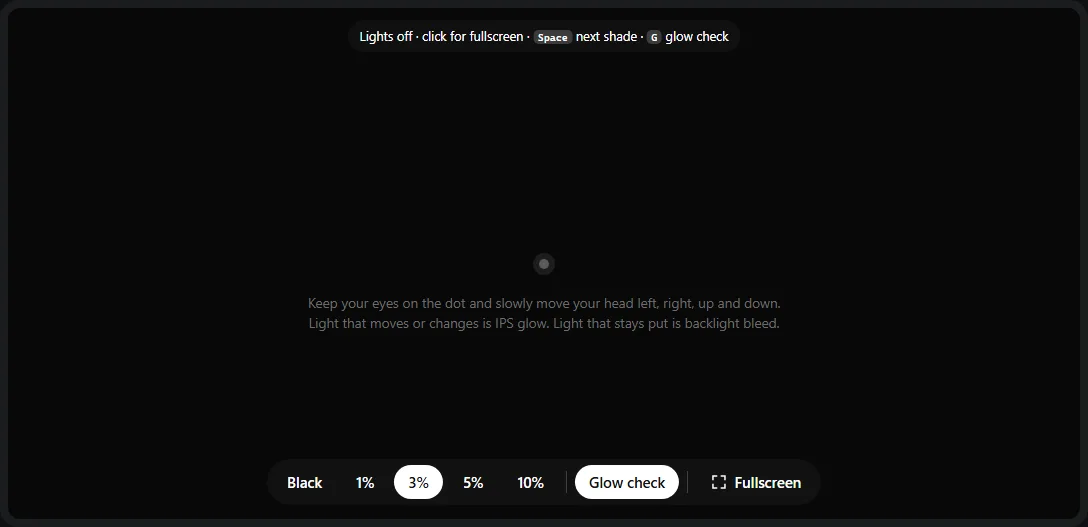
- 1Pure black and four very dark grays — keys 1–5, or Space / a click in fullscreen to step through.
- 2The glow check dot: keep your eyes on it while you move your head.
- 3Glow check (G) turns the guide on and off.
- 4Fullscreen — essential, so the test covers the panel edges where bleed starts.
Black is the hardest test an LCD can face: the backlight is fully on behind every pixel and the liquid crystal has to block all of it. Very dark grays are closer to what you see in real dark scenes, so if something only shows on pure black at maximum brightness, it is unlikely to bother you in practice.
Backlight bleed, IPS glow or clouding?
Three different things make a black LCD screen look uneven. They have different causes, and only one of them is a manufacturing defect worth returning a monitor for.
The head-movement test
This is the most reliable way to tell glow from bleed without any equipment. Bleed comes from light physically leaking past the panel, so it is in the same place no matter where you look from. IPS glow depends on the angle between your eye and each part of the screen, so it shifts, grows and fades as you move.
| Backlight bleed | IPS glow | Clouding | |
|---|---|---|---|
| Where | Along edges and corners, starting right at the bezel | Corners, usually strongest at the bottom | Anywhere, including the middle |
| When you move your head | Stays put | Moves, changes brightness and color | Mostly stays put |
| When you sit farther back | Same | Fades noticeably | Same |
| Panel types | All LCDs (IPS, VA, TN) | IPS only | All LCDs, mostly VA and large TVs |
| Cause | Uneven pressure or gaps around the panel | How IPS liquid crystal and polarizers behave off-axis | Uneven diffuser layers or backlight |
| Defect? | Can be, if visible in normal use | No — normal for IPS | Can be, if visible in normal content |
How to photograph backlight bleed accurately
If you want to post a photo or send one with a return request, the camera needs to show what your eyes see. Auto mode will not: it brightens a black screen until it looks like a mid-gray, turning faint bleed into glowing blotches.
- Turn off Night mode and HDR capture. They stack long exposures and make every LCD look terrible.
- Lower the exposure. On iPhone, tap the screen and drag the sun icon down; on Android, use the exposure slider or Pro mode (try ISO 100–400 and a shutter speed around 1/30 s). Keep lowering until the photo looks like the screen does in person.
- Shoot straight on from your seat, with the camera centered at eye height. A photo from close up or from the side shows IPS glow as if it were severe bleed.
- Take a second photo on dark content — a dark movie scene or game menu at your normal brightness. That shows whether the problem matters in real use, which is what a retailer or support agent will want to know.
Leave a little room light off-screen if the camera refuses to cooperate: it gives the camera a reference and keeps it from boosting the exposure as much.
Is your bleed normal or a defect?
No standard defines acceptable backlight bleed, and manufacturers rarely publish limits. In practice:
- Normal: faint unevenness you can only see on a full black screen, in a dark room, at high brightness. IPS glow in the corners at close range. A faint overall gray instead of true black.
- Worth returning: bleed you can see in normal dark content at your usual brightness from your normal seat — a bright patch in a letterboxed film, a yellow corner during a dark game. A bright, sharply defined spot or streak, or bleed that suddenly appears after the monitor was moved.
Use the store’s return window if you can; it is usually far easier than a warranty claim, where bleed is often judged as “within specification”. Be aware that an exchange is a new roll of the dice — the replacement can be better or worse. While the monitor is out, also check it for dead pixels, which are easier to make a case for.
Causes and what you can do
Backlight bleed
- Cause: the frame, bezel or back cover presses unevenly on the panel, or light escapes through a gap at the edge. It varies from unit to unit of the same model.
- Reduce brightness. Bleed scales with the backlight. Lowering brightness from 100% to a comfortable level for a dark room often makes it disappear in real content.
- Check the mount. Overtightened VESA or stand screws can press on the panel. Loosen them slightly and check again.
- Loosening the case screws works for some people but can void your warranty. Never press or massage the panel.
IPS glow
- Sit farther back — about an arm’s length or more for a 27-inch monitor. Glow depends on angle, so distance helps more than anything else.
- Center yourself and tilt the screen so you look at it straight on; lowering the monitor slightly so your eyes are level with the upper third helps with the bottom corners.
- Add some room light. A bias light behind the monitor raises your eyes’ adaptation level so glow is much less visible.
- If glow bothers you in dark content, a VA panel (more contrast, almost no glow) or an OLED (no backlight at all) is the real fix.
Clouding
Clouding comes from the diffuser and backlight layers and cannot be adjusted away. Lower brightness makes it less visible. If you see it in normal content — especially in dark sports or space scenes on a TV — it is a reasonable return reason.
Which displays are affected?
| Display type | Bleed | Glow | Typical black |
|---|---|---|---|
| IPS LCD | Possible | Yes, always to some degree | Dark gray (contrast around 1000:1) |
| VA LCD | Possible | Very little | Deeper black (contrast often around 3000:1), but colors and gamma shift at an angle |
| TN LCD | Possible | Little, but strong angle shifts | Similar to IPS |
| Mini-LED / full-array local dimming | Possible at the edges | Depends on panel | Very dark, with blooming around bright objects |
| OLED | None | None | True black — pixels switch off |
For a quick black screen without the test controls, use the black screen. To see how your panel type behaves at an angle in normal colors, try the viewing angle test.
Frequently asked questions
How do I test my monitor for backlight bleed?
Turn off the room lights, set the monitor to the brightness you normally use, open this page and press F for a fullscreen black screen. Sit where you normally sit and look at the edges and corners. Bright patches that stay in the same place when you move your head are backlight bleed; glow that moves or changes with your head position is IPS glow.
What is the difference between backlight bleed and IPS glow?
Backlight bleed is light escaping around the edges of the panel because of uneven pressure or gaps in the assembly — it stays in the same spot whatever angle you look from. IPS glow is a property of IPS panels: dark areas look brighter and silvery or amber when seen at an angle, so it is strongest in the corners, shifts as you move your head and fades when you sit farther back.
Is some backlight bleed normal?
Yes. Almost every LCD shows some unevenness on a full black screen in a dark room at high brightness. It only matters if you notice it in what you actually watch or play — dark movie scenes, letterbox bars, dark game menus — at your normal brightness and seat. There is no industry standard limit, so the store’s return window is your best lever.
Does backlight bleed get worse or better over time?
Bleed caused by pressure on the panel usually stays about the same. People sometimes report a slight improvement over the first weeks, and it can change if the monitor is knocked or the stand and VESA mount are overtightened, but you should not count on it improving. Judge it by what you see during your return window.
Can I fix backlight bleed myself?
Sometimes, but it is risky. Bleed is often caused by the bezel or back cover pressing on the panel, and some people reduce it by slightly loosening the screws on the back. Massaging or twisting the panel can make it worse or crack it, and opening the monitor may void the warranty. If the monitor is new, exchange it instead.
Do OLED and mini-LED screens have backlight bleed?
OLED has no backlight, so it has neither bleed nor IPS glow — black pixels are simply off. Check near-black uniformity with the OLED test instead. Mini-LED screens can still have edge bleed, but their typical issue is blooming: halos around bright objects on dark backgrounds, which the blooming test shows.
Why does backlight bleed look so much worse in photos?
A phone camera sees a black screen in a dark room and automatically raises the exposure until it looks bright — so faint bleed becomes a bright yellow blotch. Night mode makes it even worse. Lower the exposure until the photo matches what your eyes see, and shoot straight on from your seat (see the photo guide above).
Last updated . Runs entirely in your browser — nothing is uploaded.