How to use the screen size calculator
- Enter the diagonal and pick the aspect ratio. TVs and most monitors are 16:9; laptops are often 16:10. Ultrawides are listed by their real ratio, because “21:9” covers three slightly different shapes.
- Read the width and height. These are the visible picture, without bezels. Switch between inches and centimeters at the top.
- Compare. Screen 2 is drawn to scale on top of Screen 1, with the difference in area underneath.
- Check the viewing distance table to see where to sit — or which size suits the distance you already have.
Width and height from the diagonal
A screen’s width, height and diagonal form a right triangle, so for an aspect ratio of a:b and a diagonal D:
width = D × a ÷ √(a² + b²)height = D × b ÷ √(a² + b²)area = width × height
For 16:9, √(16² + 9²) = 18.36, so the width is always 0.872 × the diagonal and the height 0.490 × the diagonal. Handy multipliers:
| Aspect ratio | Width = D × | Height = D × |
|---|---|---|
| 16:9 | 0.872 | 0.490 |
| 16:10 | 0.848 | 0.530 |
| 21:9 (3440 × 1440, 43:18) | 0.922 | 0.386 |
| 32:9 | 0.963 | 0.271 |
| 4:3 | 0.800 | 0.600 |
| 3:2 | 0.832 | 0.555 |
Common 16:9 screen sizes
| Diagonal | Width × height (in) | Width × height (cm) | Area vs 55″ |
|---|---|---|---|
| 24″ | 20.9 × 11.8 | 53.1 × 29.9 | 19% |
| 27″ | 23.5 × 13.2 | 59.8 × 33.6 | 24% |
| 32″ | 27.9 × 15.7 | 70.8 × 39.8 | 34% |
| 43″ | 37.5 × 21.1 | 95.2 × 53.5 | 61% |
| 50″ | 43.6 × 24.5 | 110.7 × 62.3 | 83% |
| 55″ | 47.9 × 27.0 | 121.8 × 68.5 | 100% |
| 65″ | 56.7 × 31.9 | 143.9 × 80.9 | 140% |
| 75″ | 65.4 × 36.8 | 166.0 × 93.4 | 186% |
| 77″ | 67.1 × 37.8 | 170.5 × 95.9 | 196% |
| 83″ | 72.3 × 40.7 | 183.7 × 103.4 | 228% |
| 85″ | 74.1 × 41.7 | 188.2 × 105.8 | 239% |
| 98″ | 85.4 × 48.0 | 217.0 × 122.0 | 317% |
Area grows with the square of the diagonal: a 65″ screen has (65 ÷ 55)² = 1.40 times the area of a 55″, not 1.18 times. When comparing screens with different shapes — say a 34″ ultrawide against a 27″ 16:9 monitor — compare width and height rather than the diagonal: the ultrawide is far wider but no taller.
How far to sit from your screen
There are two ways to think about distance, and the calculator shows both:
- Field of view. SMPTE’s guideline is for the screen to fill at least 30° of your horizontal vision; THX recommends about 40° for a cinema-like feel. For a 16:9 screen that works out to roughly 1.6 × and 1.2 × the diagonal.
- Resolution. Beyond a certain distance, your eyes can’t resolve individual pixels (one arcminute, about 20/20 vision). Sit farther than the 1080p distance and 4K content looks no sharper than 1080p; sit nearer than the 4K distance and even 4K pixels can become visible.
| 16:9 screen | THX 40° | SMPTE 30° | 4K detail visible within | 1080p pixels visible within |
|---|---|---|---|---|
| 43″ | 4′ 3″ (1.3 m) | 5′ 10″ (1.8 m) | 2′ 10″ (0.9 m) | 5′ 7″ (1.7 m) |
| 50″ | 5′ 0″ (1.5 m) | 6′ 9″ (2.1 m) | 3′ 3″ (1.0 m) | 6′ 6″ (2.0 m) |
| 55″ | 5′ 6″ (1.7 m) | 7′ 5″ (2.3 m) | 3′ 7″ (1.1 m) | 7′ 2″ (2.2 m) |
| 65″ | 6′ 6″ (2.0 m) | 8′ 10″ (2.7 m) | 4′ 3″ (1.3 m) | 8′ 5″ (2.6 m) |
| 75″ | 7′ 6″ (2.3 m) | 10′ 2″ (3.1 m) | 4′ 11″ (1.5 m) | 9′ 9″ (3.0 m) |
| 77″ | 7′ 8″ (2.3 m) | 10′ 5″ (3.2 m) | 5′ 0″ (1.5 m) | 10′ 0″ (3.1 m) |
| 85″ | 8′ 6″ (2.6 m) | 11′ 6″ (3.5 m) | 5′ 6″ (1.7 m) | 11′ 1″ (3.4 m) |
| 98″ | 9′ 9″ (3.0 m) | 13′ 3″ (4.0 m) | 6′ 4″ (1.9 m) | 12′ 9″ (3.9 m) |
In practice, most living rooms put the sofa 2.5–3 m (8–10 ft) from the TV — around or beyond the 1080p line for a 65″ set. That is why going bigger usually improves the picture more than going from 4K to 8K. These are guidelines, not rules: comfortable is whatever lets you see the whole screen without turning your head.
Monitors: desks put you about 50–80 cm (20–30″) away. At that distance, a 27″ 16:9 screen already fills roughly 40–60° of your view, and the deciding factor is pixel density — see the PPI calculator.
Measure your own screen with a card
Websites can’t read your screen’s physical size — a CSS “inch” is defined as 96 pixels, not a real inch, so the same page measures differently on every display. The Measure your screen tab gets around this with something everyone has: a bank card. Credit cards, debit cards and most ID cards and driver’s licenses follow the ISO/IEC 7810 ID-1 size of exactly 85.60 × 53.98 mm.
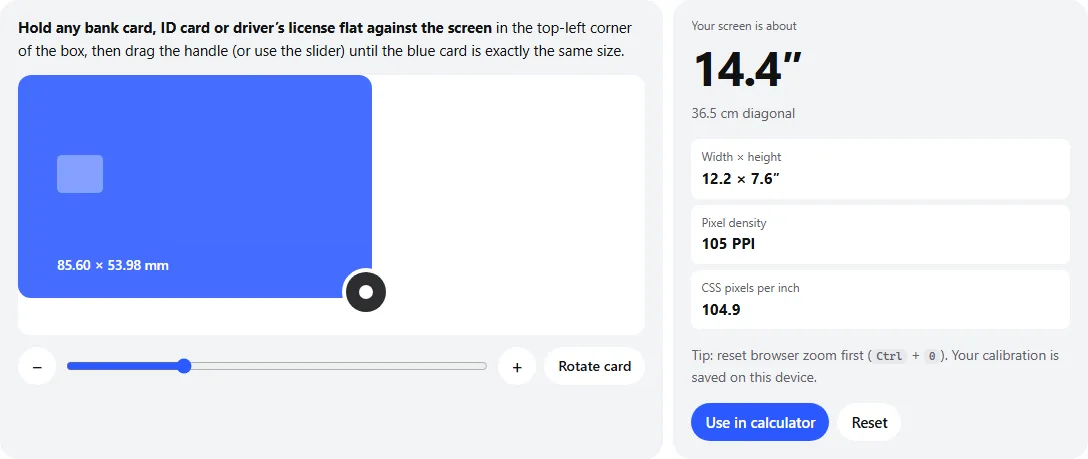
- 1Hold your card here, aligned with the top-left corner.
- 2Drag the round handle until the blue card matches the real one exactly.
- 3Fine-tune with the slider or the − and + buttons (or arrow keys on the handle).
- 4Your screen’s diagonal, width, height and pixel density update as you go.
- Reset browser zoom (Ctrl + 0 or ⌘ + 0).
- Hold the card flat against the screen, lined up with the top-left corner of the box. Use the back so you don’t display the card number.
- Drag the handle until the blue card exactly covers your card. On a phone, Rotate card stands it upright so it fits.
- Read your screen size. One pixel of misalignment changes the result by well under 1%.
The page measures how many pixels make up a millimeter on your display, then multiplies by your screen’s width and height in pixels. The diagonal it reports is the visible picture area, which is how screens are sold. It also shows your real pixel density; on a Mac using a scaled resolution, that density is for the rendering resolution rather than the panel’s native one.
Measuring with a tape measure
Measure the visible picture from one corner to the opposite corner, without the bezel. On TVs, measure the width instead and divide by 0.872 to get the diagonal (16:9) — it’s easier to hold a tape horizontally. To find a screen’s resolution and scaling, use the screen resolution checker; to work out shapes and resizes, the aspect ratio calculator.
Frequently asked questions
How is screen size measured?
Diagonally, from one corner of the visible picture to the opposite corner — not including the bezel or frame. TVs are often sold by “class”: a 65″ class TV may measure 64.5″ diagonally.
How wide is a 65-inch TV?
A 65-inch 16:9 screen is 56.7 inches wide and 31.9 inches tall (144 × 81 cm). Add the bezel and stand to get the full size of the TV — usually an extra 1 to 2 inches in width.
How much bigger is a 65-inch TV than a 55-inch TV?
About 40% bigger in screen area: (65 ÷ 55)² = 1.40. Area grows with the square of the diagonal, so a 10-inch jump looks larger than it sounds. A 75″ is 33% larger than a 65″, and an 85″ is 28% larger than a 75″.
What size TV should I get for my viewing distance?
For a cinema-like feel, divide your seating distance by about 1.2 (THX’s 40° guideline); for a more relaxed view, divide by about 1.6 (SMPTE’s 30° guideline). At 2.5 m (98″) that suggests a 60–82″ 16:9 screen. With a 4K TV, sitting at the closer end is fine because the pixels are still too small to see.
Is a 34-inch ultrawide bigger than a 27-inch monitor?
It is wider but almost exactly the same height. A 34″ 3440 × 1440 ultrawide measures 31.4 × 13.1 inches; a 27″ 16:9 monitor is 23.5 × 13.2 inches. So the ultrawide adds about 34% more width, not a bigger picture all round.
How can I find out my screen size without a tape measure?
Use the Measure your screen tab above: hold a bank card to the screen and match the on-screen card to it. Because every card is exactly 85.60 × 53.98 mm, the page can work out your screen’s physical size. Browsers can’t report the physical size on their own.
Why doesn’t the measured size exactly match the advertised size?
Advertised sizes are rounded (a “15.6-inch” laptop may be 15.55″, a “65-inch class” TV 64.5″), and a one-pixel mismatch when lining up the card changes the result by a few tenths of a percent. Within about 0.2″ on a laptop or monitor is a good match.
Last updated . Runs entirely in your browser — nothing is uploaded.