How to fill your screen with any color
- Pick a color. Click a preset in the bar over the color (or press 1–9, ← →), use the picker, or type into the box:
#FF8800,f80,255 136 0,rgb(255,136,0)or a name likecoral. - Dim it if you need to. The Brightness slider (or ↑ ↓) darkens the color evenly in all channels, so orange stays orange instead of drifting toward red.
- Go fullscreen. Click the color or press F. In fullscreen, press A or tap Adjust to change the color without leaving.
- Share it. As soon as you change the color, the address bar holds it (for example
?c=ff8000). Copy link puts that address on your clipboard.
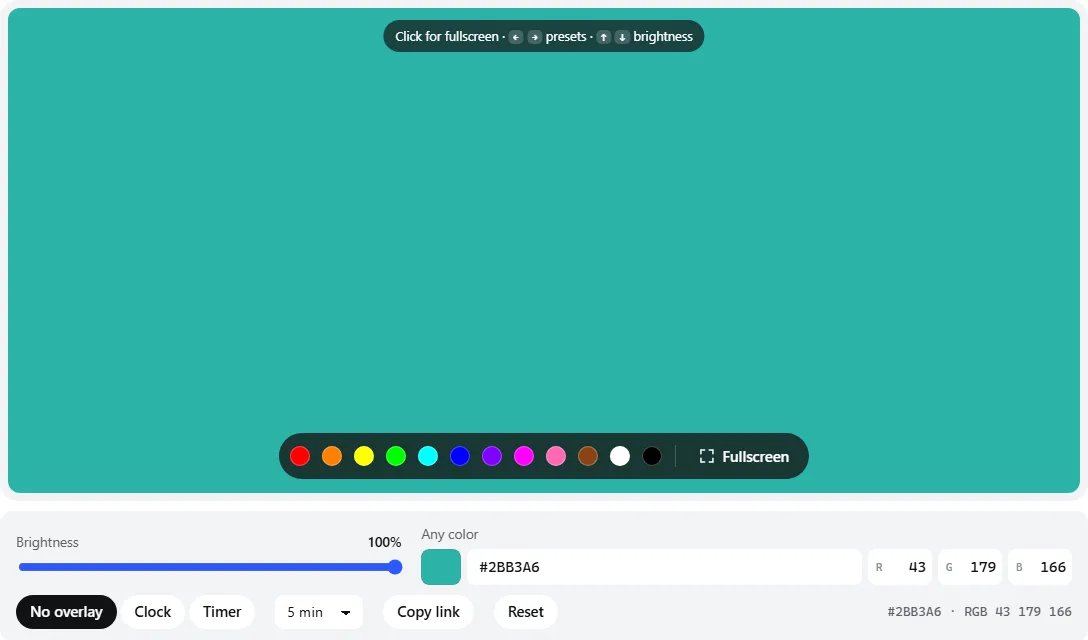
- 1Twelve presets — click one, or press 1–9 and ← →.
- 2Brightness dims every channel evenly, so the hue stays the same.
- 3Color picker and a text box for hex,
rgb(), three numbers or a color name. - 4Exact red, green and blue values, 0–255.
?c=2bb3a6, so Copy link shares exactly this teal.The page remembers your last color on this device. On iPhone, Safari can’t hide its toolbars for a web page; add the page to your home screen (Share → Add to Home Screen) and open it from there for edge-to-edge color.
Preset colors and the subpixels they use
Every color on a screen is a mix of red, green and blue subpixels. Knowing which ones a color lights helps when you are hunting for a faulty subpixel or picking a color for lighting.
| Color | Hex | Subpixels lit |
|---|---|---|
| Red | #FF0000 | R |
| Orange | #FF8000 | R + half G |
| Yellow | #FFFF00 | R + G |
| Green | #00FF00 | G |
| Cyan | #00FFFF | G + B |
| Blue | #0000FF | B |
| Purple | #8000FF | B + half R |
| Magenta | #FF00FF | R + B |
| Pink | #FF69B4 | R + some G and B |
| Brown | #8B4513 | Dim R + G |
| White | #FFFFFF | R + G + B |
| Black | #000000 | None |
The mixed colors are useful for defect hunting: on yellow the blue subpixels are off, so a stuck blue subpixel shows as a white dot; on cyan a stuck red one shows; on magenta a stuck green one. Single-color pages with notes on each subpixel are at red, green and blue, and the dead pixel test cycles through all of them.
What people use a solid color screen for
- Colored lighting. A tablet or spare monitor makes a soft colored panel for product photos, a rim light in a portrait, or mood light behind a desk. It is not very bright, so it works best close to the subject in a dim room.
- A backdrop. Solid color behind a small object or on a phone screen in a video, to key out later or simply for a clean background. For keying, the green screen and blue screen have chroma-key shades.
- Signals and status. Red or green on a spare tablet outside a door (“recording” or “free”), a color cue for a team at an event, or phones held up in a crowd.
- Night light. A dim amber or red is easier on dark-adapted eyes than white. Turn the device brightness down first.
- Checking a color code. See a brand or design color at full size before you use it, or compare how one hex value looks on several devices.
Why the hex code isn’t the whole story
A hex code like #FF8000 is three numbers from 0 to 255 for red, green and blue. They say how hard to drive each subpixel, not exactly which color comes out. Two things change the result:
- The display’s gamut. Websites assume the sRGB color space. Wide-gamut screens (many OLED phones and newer monitors) can show deeper colors, and if color management is off, sRGB colors look over-saturated on them. The color gamut test shows what yours can do.
- White point and calibration. A warm color mode, Night Shift, Night Light or True Tone tints every color. An uncalibrated panel may also lean green or magenta.
If you need a color to look right on screen — for design work or matching a printed sample — calibrate first with the monitor calibration guide. Even then, a screen (emitted light) and paint or fabric (reflected light) only match under the lighting you compare them in.
Frequently asked questions
How do I make my screen a specific color?
Type the color into the box under the screen — a hex code like #FF8800, an RGB value like 255, 136, 0 or a color name like teal — or use the color picker. Then click the color area or press F to fill the whole display.
Can I share or bookmark a color?
Yes. The page address updates as you change the color, for example screentest.dev/color-screen?c=ff8800. Click Copy link, or bookmark the page; opening the link shows that exact color.
Which color formats can I enter?
Hex with or without # (f80, #ff8800), rgb(255, 136, 0) or three numbers separated by commas or spaces, and any CSS color name such as orange, teal or rebeccapurple. You can also type each channel into the R, G and B boxes.
Why does the same color look different on my phone and my monitor?
Screens have different color gamuts, white points and calibration. A wide-gamut phone may show a hex color more saturated than an sRGB monitor, and Night Shift, True Tone or a warm color mode shift every color. The hex value is the same; the light each screen makes from it is not. See the color accuracy test.
What color screen is best as a night light?
A dim red or amber (try #FF8000 with the brightness turned down) disturbs night vision and your body clock less than white or blue. Use the red screen for its dedicated night-vision presets, and keep the device brightness low.
Can I use a colored screen as a photography light?
For small, close subjects — product shots, jewelry, a colored rim light in a portrait — a tablet or monitor works as a soft colored panel. It is far weaker than a real light, so put it close and keep other lights low. Pure colors like red or blue produce the strongest tint.
Last updated . Runs entirely in your browser — nothing is uploaded.